
The Chinese Government Scholarship (CGS) is one of the most prestigious and fully-funded scholarship programs in the world, offering international students the opportunity to pursue undergraduate, master's, and doctoral degrees at top Chinese universities — with tuition, accommodation, and a monthly stipend all covered. Each year, tens of thousands of students from over 180 countries apply through the official online portal.
But navigating the application system for the first time can be confusing. This guide walks you through every step of the process, from creating your account to printing your final application form, so you can apply with confidence.
# Before You Begin: Preparation Checklist
Before opening the application portal, make sure you have the following ready:
Browser Recommendation: Use Firefox or Internet Explorer 11 for the best compatibility. If you use IE, make sure to disable Compatibility View mode — this is a common source of display issues that trips up many applicants.
Language Options: The system supports both Chinese and English. You can switch between the two at any time using the "中文 | English" toggle in the top-right corner of the page.
Official Portal URLs:
Both URLs lead to the same system — the Chinese Government Scholarship Information System (CGSIS), managed by the China Scholarship Council (CSC).
# Step 1: Register Your Account
The first thing you need to do is create an account on the CGSIS portal.
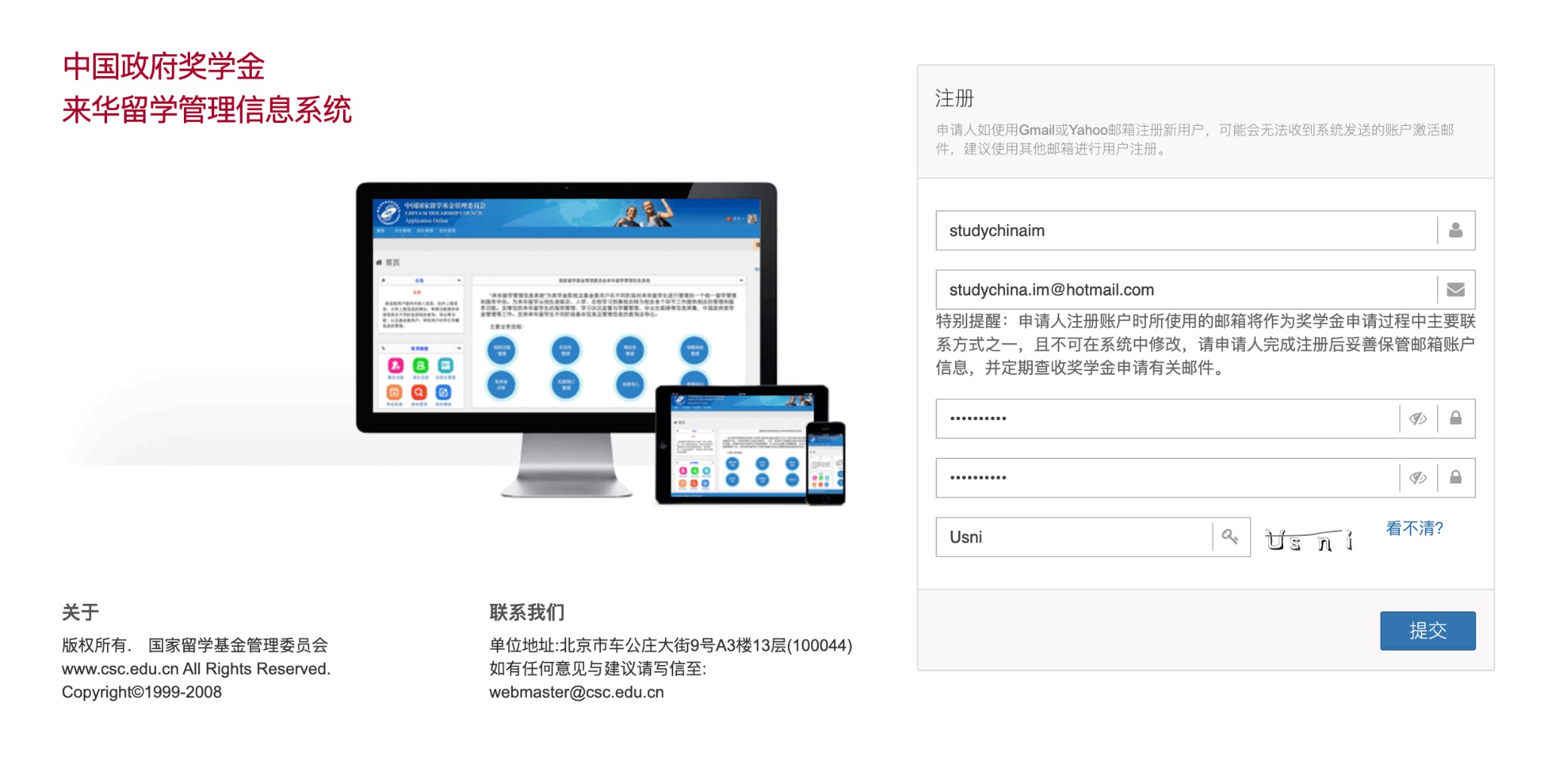
Critical warning about email: Do not use Gmail or Yahoo email addresses to register. Many applicants have reported never receiving the system's activation email when using these providers. Use a university email, Outlook, Hotmail, or another provider instead.
**Important:** The email address you register with becomes your primary contact channel throughout the entire scholarship process. It **cannot be changed** after registration. Guard it carefully and check it regularly for updates from CSC and your receiving institution.
Once you submit the registration form, check your inbox for an activation link. Click it to activate your account, then log in.
# Step 2: Read the Instructions Carefully
After logging in, you will land on the Home / Instructions page. This page contains the official guidelines from CSC — read it thoroughly before proceeding.
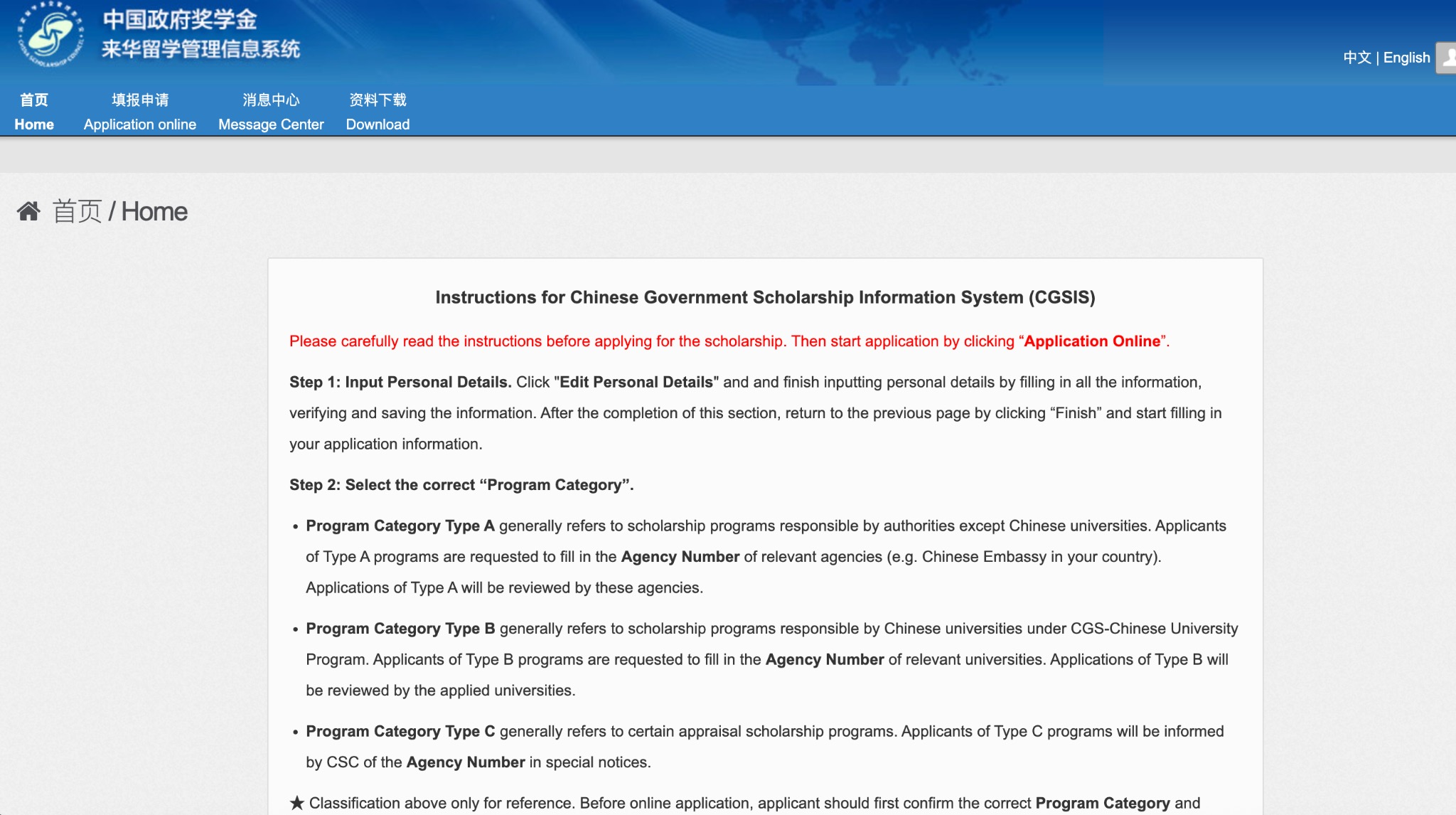
The instructions explain the three program categories (Type A, B, and C), which we will cover in detail in Step 4. Understanding the difference before you start filling out your application will save you significant time and prevent costly mistakes.
# Step 3: Navigate to "Application Online"
From the home page, click "Application Online" (填报申请) in the top navigation bar. You will see your current application dashboard.
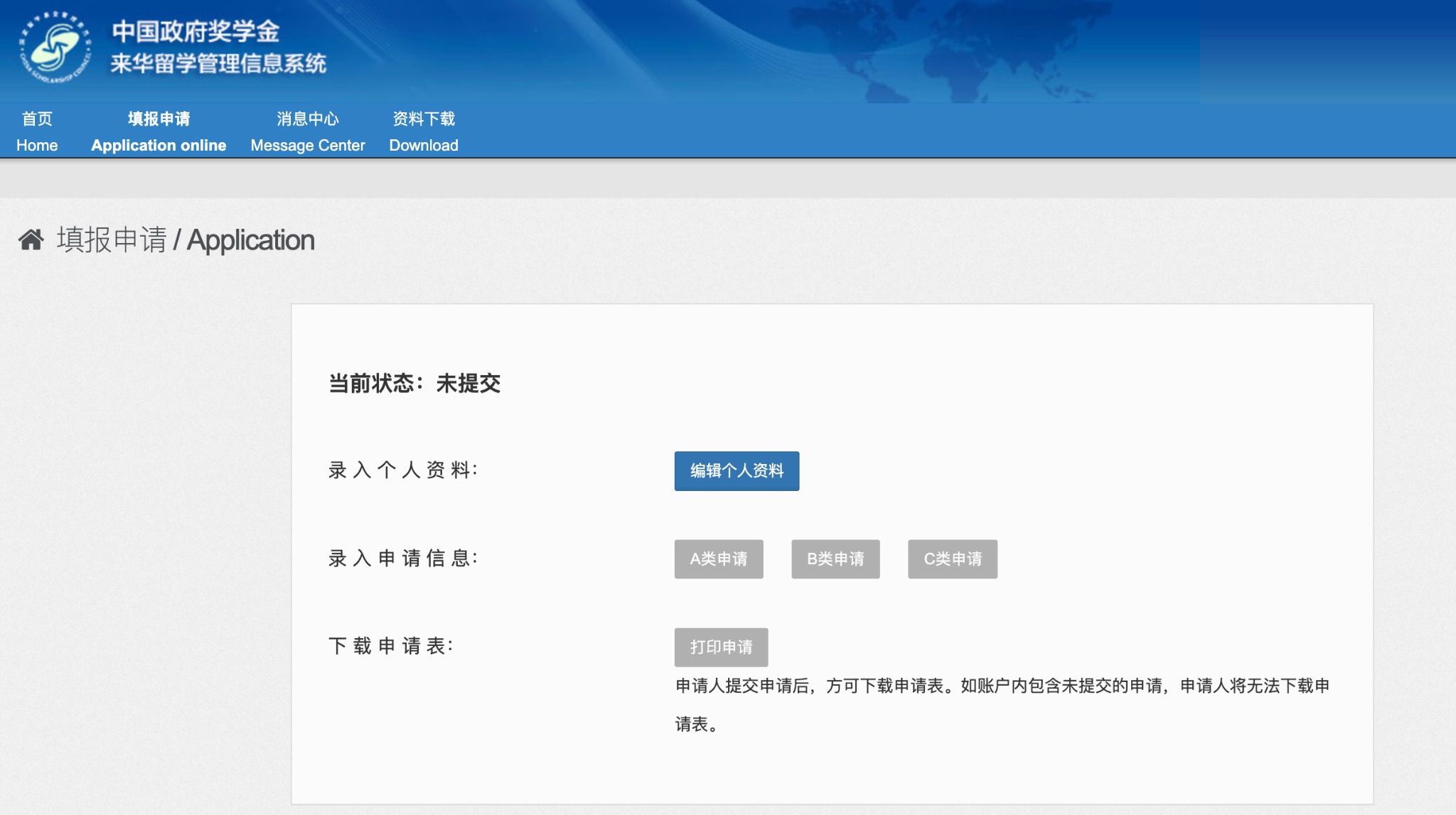
The dashboard has three main sections:
| Section | Action |
|---|---|
| Enter Personal Details | Click "Edit Personal Details" to fill in your profile |
| Enter Application Information | Choose Type A, B, or C application |
| Download Application Form | Only available after submission |
Important: You must complete and submit your personal details first before you can fill in the application information. The system enforces this order.
# Step 4: Fill In Your Personal Details
Click "Edit Personal Details" to open the personal information form. This is the most detailed section of the application.
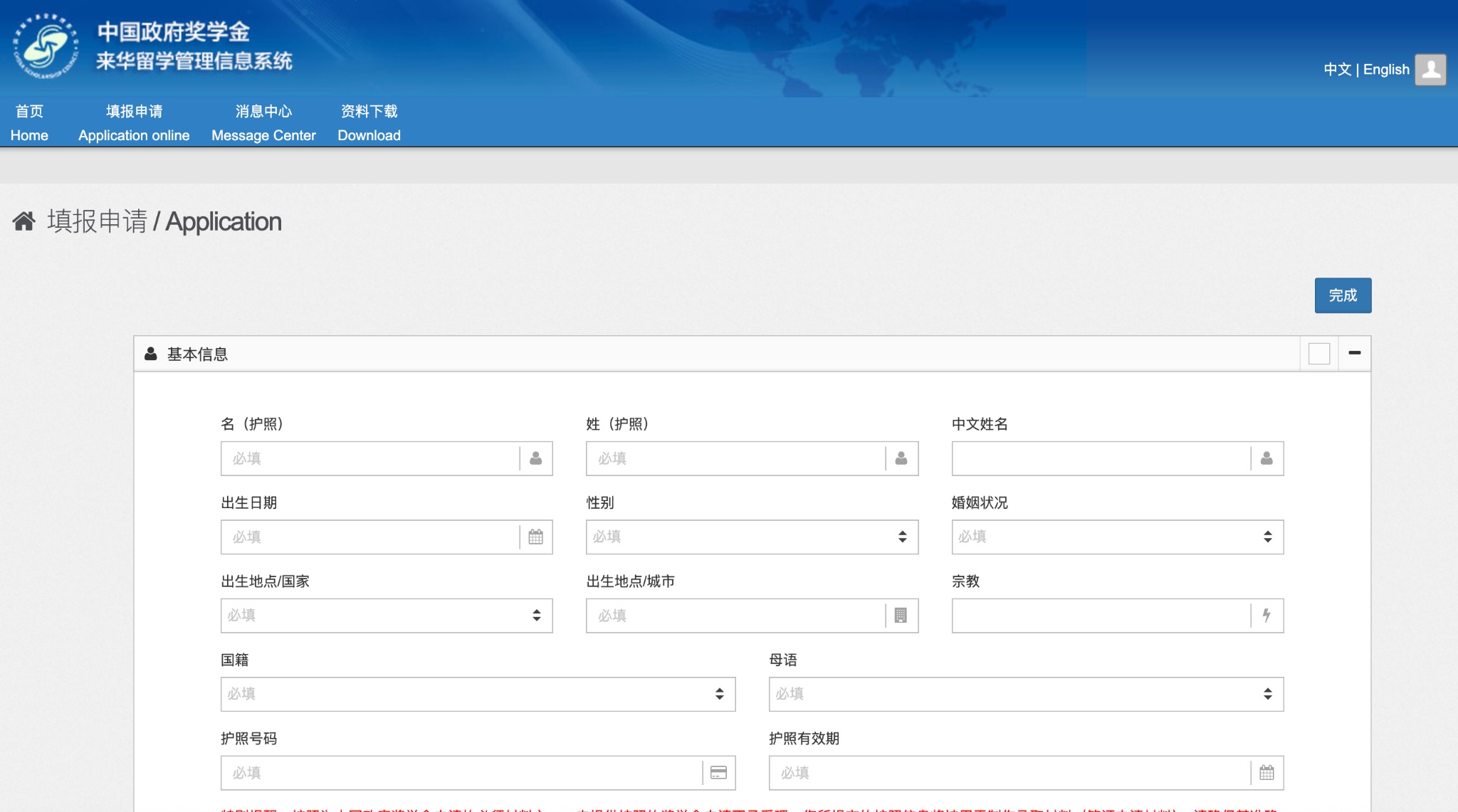
The form is divided into several sections:
- Basic Information: Name (as on passport), date of birth, nationality, passport number and expiry date, religion, marital status
- Education and Work History: Your academic background and professional experience
- Emergency Contact in China: A contact person in China (can be left tentative at this stage)
After completing each page, click "Verify and Save" to preserve your progress. The system does not auto-save. Once all sections are complete, click "Finish" to lock your personal details and return to the application dashboard.
# Step 5: Select Your Program Category and Agency Number
This is the most critical step in the entire application. You must select the correct Program Category and enter the corresponding Agency Number.
# Understanding the Three Program Types
Type A — Embassy/Agency Programs Type A refers to scholarship programs administered by authorities outside Chinese universities — typically the Chinese Embassy or Consulate in your home country, or other designated agencies. If you are applying through your country's Chinese Embassy, you are applying for a Type A program.
- You must obtain the Agency Number of the relevant Chinese Embassy or agency in your country.
- Your application will be reviewed and forwarded by that agency.
Type B — Chinese University Programs (CGS-CUP) Type B refers to scholarships administered directly by Chinese universities under the CGS-Chinese University Program. If you have been in contact with a specific university and they have invited you to apply, or if you are applying directly to a university, this is likely Type B.
- You must enter the Agency Number of the specific university you are applying to.
- Your application will be reviewed by the university's admissions office.
- You can submit multiple Type B applications to different universities simultaneously — this is a significant advantage compared to Type A.
Type C — Special Assessment Programs Type C covers certain special scholarship programs. The Agency Number for Type C applications is provided by CSC directly in official notices. If you have not received such a notice, this category likely does not apply to you.
**Before selecting your category:** Confirm with your sponsoring agency (embassy, university, or CSC) which program category and exact Agency Number you should use. Using the wrong number is one of the most common reasons applications are rejected or delayed.
# Step 6: Fill in Application Information and Upload Documents
Once you have selected your program category and entered the Agency Number, you can proceed to fill in the application details:
- Language Proficiency and Study Plan: Describe your Chinese and/or English language ability, and write a clear study plan explaining your academic goals in China.
- Upload Supporting Documents: See the document checklist below.
# Mandatory Documents (Must Upload)
| Document | Notes |
|---|---|
| Passport-size photo | Recent, clear, white background |
| Highest degree certificate | Or notarized copy |
| Official transcripts | For your highest degree, or notarized copy |
| Study plan in China | Your academic and research proposal |
| Recommendation letter (1st) | From a professor or supervisor |
| Recommendation letter (2nd) | From a second professor or supervisor |
| Foreigner Physical Examination Form | Must use the official CSC form |
# Optional Documents (Recommended)
- Passport bio-data page
- Acceptance letter or pre-admission notice from a Chinese university
- Published papers or academic articles
- Portfolio (for arts programs)
- HSK certificate (Chinese proficiency)
- English proficiency certificate (IELTS, TOEFL, etc.)
- Other supporting materials
# File Format and Size Requirements
This is where many applicants encounter technical difficulties. The system has strict requirements:
- Accepted formats:
.jpg,.jpeg,.pngonly — no PDF - Maximum file size: 80 KB per file — this is very small; you will need to compress your documents
- One file per document: If a certificate has multiple pages, you must merge them into a single image before uploading
- Filename length: Keep filenames under 30 Chinese characters or 60 English characters
- No encrypted files or files with macros
**Practical tip for the 80 KB limit:** Use an image compression tool like [Squoosh](https://squoosh.app) or [TinyPNG](https://tinypng.com) to reduce file sizes. For multi-page documents, use a photo collage app to combine pages into one image before compressing.
# Submitting Recommendation Letters
You have two options for recommendation letters:
- Direct Upload: Scan the signed letter yourself and upload it as an image file.
- Third-Party Recommendation: Enter your recommender's name and email address in the system, then click "Save and Notify." The system will automatically send them an email with a link to upload the letter directly. This is the preferred method as it is more formal and reduces the risk of the letter being questioned.
# Step 7: Review and Submit
Before clicking "Submit", carefully review every section of your application:
- Are all mandatory documents uploaded?
- Is the Agency Number correct?
- Does your study plan clearly explain your academic goals?
- Are all personal details consistent with your passport?
Once you click "Submit", your application information will be locked. If you need to make changes after submission, you can click "Withdraw" to retract your application — but only if the receiving agency has not yet started reviewing it. Once an agency begins processing your application, withdrawal is no longer possible.
# Step 8: Print and Send Your Application
After successful submission, go back to the Application Dashboard and click "Print Application" to download a PDF version of your completed application form.
Most receiving agencies require you to:
- Print the application form and sign it
- Compile all supporting documents in hard copy
- Mail the complete package to the agency by the specified deadline
Check the specific requirements of your receiving agency carefully, as deadlines and mailing addresses vary.
# Final Thoughts
The Chinese Government Scholarship is a transformative opportunity, and the application process — while detailed — is entirely manageable if you approach it systematically. Start early, confirm your Agency Number before anything else, and pay close attention to the file format requirements.
If you have questions about specific universities, program categories, or scholarship coverage, explore the Universities and Resources sections of StudyChina.im for detailed guides and official links.
Good luck with your application — your journey to studying in China starts here.